How to contact technical support
Article goal
Learn how to quickly contact the right support service to resolve issues: IZI technical support for app failures, or the club administrator for local on-site problems.
Who this article is for
- All users of the IZI app
- Clients facing technical issues
- Users who want to save time when solving problems
What you will learn
- How to quickly find technical support contacts
- In which cases to contact IZI support and in which cases the club administrator
- How to correctly describe a problem to speed up its resolution
- Why it is important to send requests to the right service
Why is it important to know where to report a problem?
Correctly choosing where to send your request allows you to:
- Save time — solve the problem the first time without having your request redirected
- Get qualified help — each service solves its own range of issues
- Speed up resolution — specialists work faster within their area of expertise
- Avoid frustration — you don’t waste effort explaining the issue to the wrong person
- Plan your time effectively — understand how quickly the problem is likely to be resolved
In short: sending your request to the right place is 50% of success in solving the problem.
Step-by-step guide
Step 1. Go to your profile
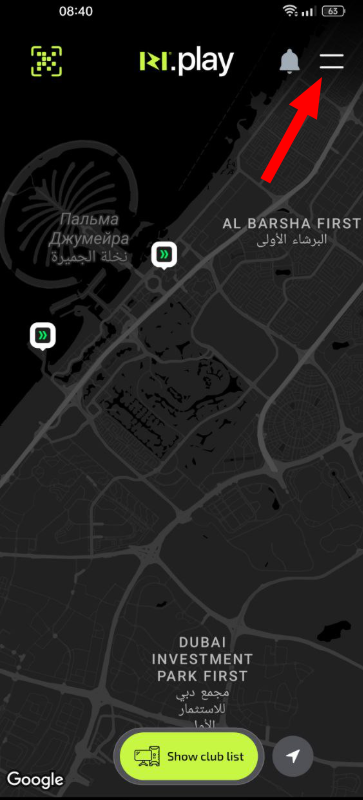
- Open the IZI app
- Tap your profile icon in the corner of the screen
Why this matters: All support and administration services are available through your personal account to ensure security and keep a history of requests.
Step 2. Find the support contact option
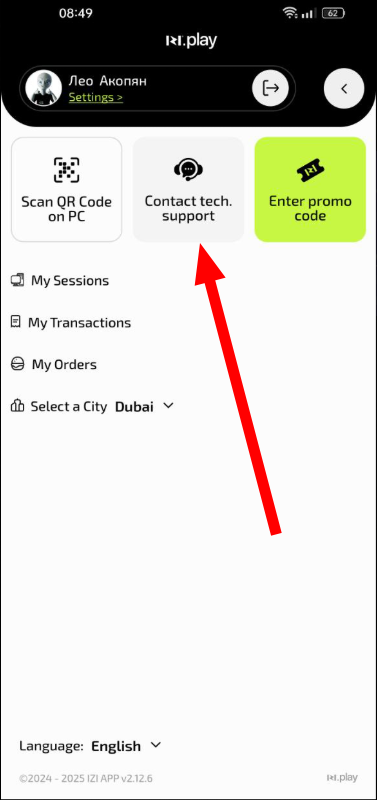
- In the profile menu find the “Help” or “Support” section
- Tap the “Contact support” button
- Describe your problem in the opened form
Why this matters: This is a direct communication channel with the app developers who resolve system-level problems.
Where to report issues in different situations
Contact IZI technical support if:
- App errors — the app crashes, freezes or does not start
- Display issues — tariffs, balance or operation history are not shown
- Payment failures — you paid but the session did not start, or money was not credited to the balance
- Account problems — you cannot log in to your profile, or there are issues linking a card
- Promo code errors — the promo code does not activate even though it was entered correctly
- Technical failures — QR-code scanning does not work, data does not synchronise
Why contact IZI technical support? These specialists work with the app code and the server side of the system.
Contact the club administrator if:
- Equipment issues — slow PC, mouse/keyboard not working, no sound
- Network issues — no internet, slow internet, online games not working
- Game issues — games lag, freeze or do not start
- Refunds — you need to return funds to your balance or cancel an incorrect debit
- Bar orders — the order was not delivered, there is a mistake in the order, questions about the menu
- Local issues — noisy neighbours, it is too cold/hot in the room, you need on-site help
- SMS problems — no SMS code for login (the administrator can request a code via the club’s CRM)
Why contact the administrator? These specialists are responsible for equipment and conditions in the specific club and have access to local systems.
How to describe the problem correctly
For IZI technical support:
- Specify your phone model and OS version
- Describe which actions you performed before the error
- Attach a screenshot of the error
- Indicate when the problem occurred for the first time
For the club administrator:
- Tell them the number of your PC
- Describe the problem precisely: “Dota2 is lagging”, “no internet for 10 minutes”
- Say how long the problem has been happening
Common situations
| Problem | Where to contact and why |
|---|---|
| Payment went through but time was not credited | Club administrator — there is an issue with processing the payment on the server. Ask to have bonuses credited; the administrator will contact IZI technical support if needed. |
| The game freezes on a specific PC | Club administrator — a hardware or PC configuration issue. |
| No SMS code for login | Club administrator — can request a code via the club’s CRM system. |
| It is too noisy in the room | Club administrator — maintaining order in the room is their responsibility. |
| Transaction history is not displayed | IZI technical support — a problem with loading data from the database. |
| Mouse/keyboard does not work | Club administrator — hardware needs to be replaced on-site. |