Installing the IZI app
Article goal
Quickly and safely install the IZI app on your smartphone so that you can access PC booking, contactless payments and other club features.
Audience
Clients and visitors of computer clubs that use IZI.
What you will learn
- Which problems the IZI app solves
- How to correctly download the app from the official store (Google Play or App Store)
- What to do if the app does not install or shows an error
Why you need the IZI app
The IZI app is your digital pass to a convenient computer club experience. It removes the most common annoyances:
- “So I don’t have to wait for a free PC” → The “PC booking” feature lets you choose and book a specific computer in advance, right from home.
- “So I don’t have to stand in line at the bar” → You can top up your balance and pay for game time contactlessly through the app.
- “So I don’t worry that my time will suddenly end” → The “Auto extension of tariff” feature ensures that your game is not interrupted.
- “So I can start playing quickly” → “PC unlock via QR code” allows you to instantly start the PC without the administrator’s help.
In short: IZI turns your smartphone into a personal administrator.
Step-by-step installation guide
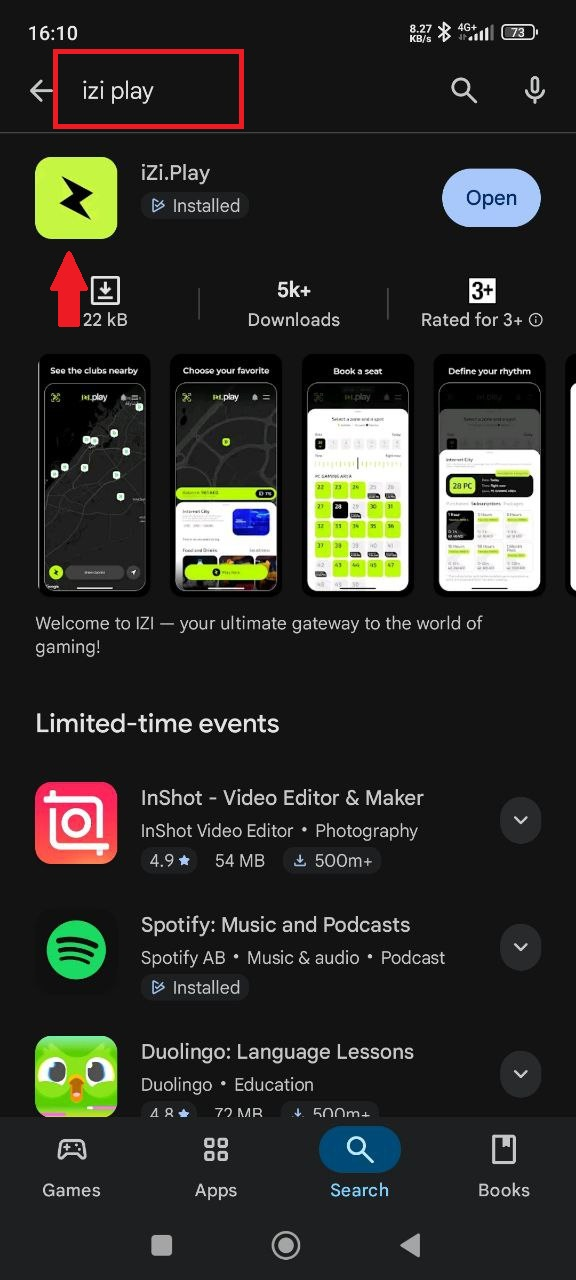
Find the app in the official store
The first step is to safely install the app on your device.
- If you have Android:
- Open the Google Play app.
- In the search bar, type IZI play or follow the direct link:
https://play.google.com/store/apps/details?id=izisoft.gg&hl=ru - Tap “Install”.
- If you have an iPhone:
- Open the App Store.
- In search, type IZI play or follow the direct link:
https://apps.apple.com/ru/app/izi-play/id6476093282 - Tap “Get”.
Why this matters: Downloading from the official stores guarantees safety. You get the original, latest version of the app without viruses.
Common problems
| Problem | What to do and why |
|---|---|
| Message “Your device is not compatible with this version” | What to do: Update the iOS/Android version on your phone. For Android, you usually need 8.0 or higher. Why: New apps use modern technologies that are not supported on outdated systems. |
| The app does not download / Stuck on loading | What to do: Check your internet connection (Wi-Fi or mobile network). Restart your phone and try again. Why: A weak or unstable connection can interrupt the download. |
| The app crashes after launch | What to do: Fully close the app and open it again. If that doesn’t help, reinstall it. Why: It may be a one-time glitch. Reinstallation downloads all files again and can fix errors. |
| I can’t find the app in search | What to do: Use the direct links above. Make sure you are searching in the correct store (Google Play for Android, App Store for iPhone). Why: Direct links ensure you land on the correct page. |