Promo code activation
Article goal
Learn how to activate promo codes in the IZI app to receive bonuses, discounts and special offers, saving money on game time and bar orders.
Who this article is for
- All users of the IZI app
- Clients participating in promotions and special offers
- Users who want to maximise the benefits of visiting clubs
What you will learn
- How to find the promo code activation section
- How to correctly enter a promo code to activate it
- Why you need to choose a club before activation
- Which benefits promo codes provide
Why activate promo codes?
Activating promo codes provides significant benefits:
- Saving money — getting discounts on game time and bar orders
- Bonus opportunities — free game time and additional services
- Participation in promotions — access to special offers for regular clients
- More game time — ability to play longer for the same money
- Trying new services — access to premium tariffs and services at a discount
In short: promo codes are a simple way to get more services for less money.
Step-by-step guide
Step 1. Go to your profile
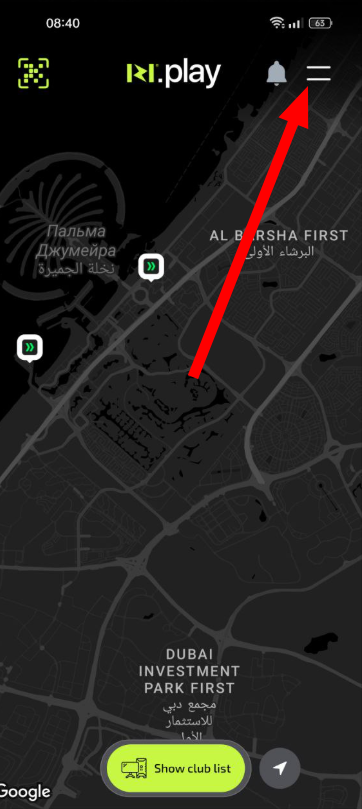
- Open the IZI app
- Tap the profile menu icon
- Find the promo code management section
Why this matters: All personal operations, including working with promo codes, are performed through your personal profile for security reasons.
Step 2. Open the promo code input section
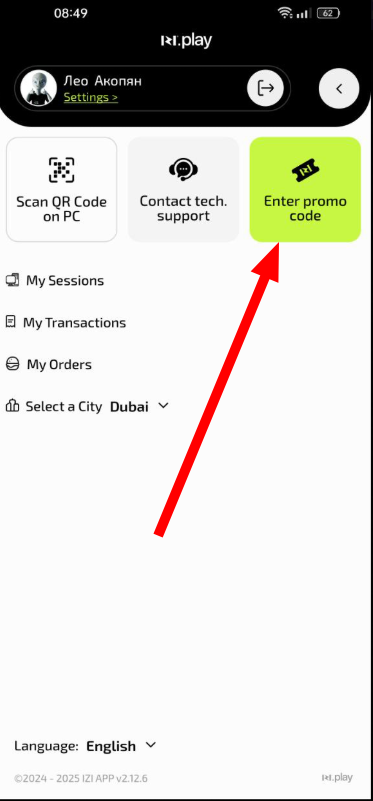
- In the profile menu find the “Enter promo code” item
- Tap it to proceed to activation
Why this matters: This is a dedicated section designed specifically for working with promo codes and promotional offers.
Step 3. Select a club
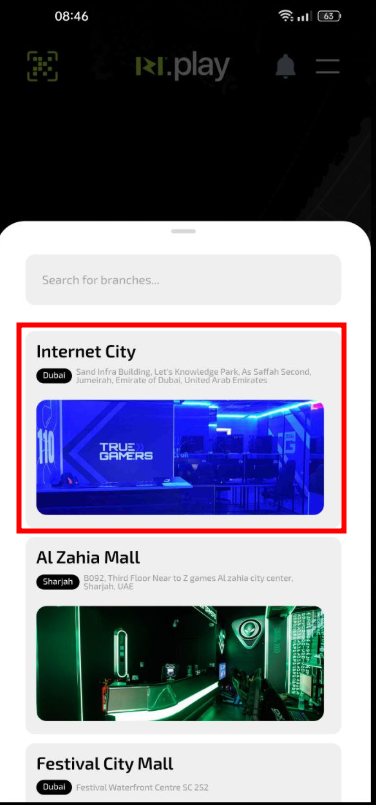
- From the list of available clubs select the one where you plan to use the promo code
- Confirm your choice
Why this matters: Some promo codes are valid only in specific clubs or have territorial restrictions.
Step 4. Enter and activate the promo code
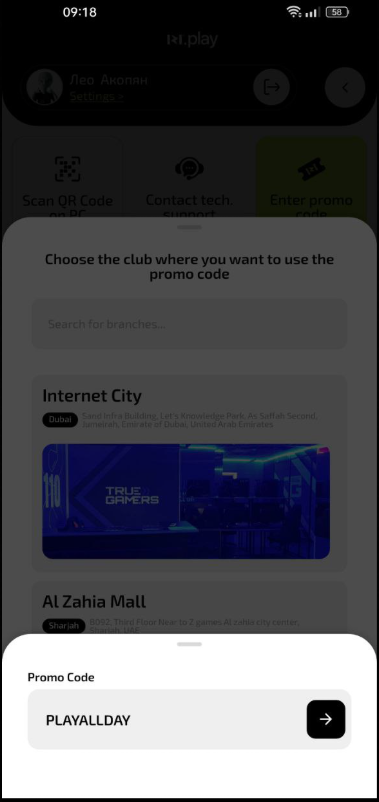
- Enter the exact promo code combination without mistakes
- Check that it is correct
- Tap the “Activate” button
- Wait for confirmation of successful activation
Why this matters: Accurate entry of the promo code guarantees correct activation and receiving all the bonuses due.
What to do after activating a promo code
- Check your balance — make sure the bonuses have been credited
- Review the terms — check the promo code validity period and restrictions
- Use the bonuses — apply the received benefits during your next visit
- Keep the confirmation — in case any questions arise
Common situations
| Problem | What to do and why |
|---|---|
| The promo code does not activate | What to do: Check the correctness of the code, its validity period and whether it is applicable to the selected club. Why: Promo codes may have limitations by time, place of use or number of activations. |
| I don’t see credited bonuses | What to do: Check your transaction history. Refresh the app. Contact the club administrator. Why: Sometimes it takes time for the request to be processed and the bonuses to appear in the system. |
| The promo code is activated but does not work | What to do: Make sure you meet all the promotion conditions. Contact the club administrator. Why: Some promo codes require certain conditions to be fulfilled before they can be applied. |
| I can’t find the promo code section | What to do: Check the main app menu — the “Enter promo code” icon. If you still cannot find it, ask the club administrator to help you. Why: The app interface may be updated, changing the position of elements. |