1.8 Information About IZI.IS Technical Support
Article Purpose
To explain the different ways you can contact IZI.IS technical support and which communication channel is suitable for each type of user.
Who this article is for
- Club administrators
- Club owners
- Managers with access to the IZI.IS CRM
- Mobile app users
What you will learn
- Which support channel to choose depending on the situation
- How to contact support via the club’s Telegram chat
- How to write to support through the CRM
- How users can contact IZI through the mobile app
Prerequisites
Before contacting support, make sure that:
- You have an internet connection.
- You are logged into the CRM or the mobile app (if you are using them to reach support).
- You are ready to briefly describe the issue and attach screenshots if they will help resolve it.
Technical Support Contact Channels
1. Club Chat in Telegram
This is the main and fastest way to contact support.
Every club has its own chat with the IZI team in Telegram, created during the onboarding process.
How to contact support:
- Open the club’s Telegram chat.
- Describe the issue as clearly as possible: what happened, on which device, and at what time.
- Attach screenshots if necessary.
- Wait for a response from the support specialist — usually within a few minutes.
2. Contacting Support Through the CRM

This option is suitable for administrators working in IZI CRM. After clicking the button, the system automatically opens a dialogue with support in Telegram.
How to contact support:
- Log in to the CRM with your account.
- In the top-right corner, click the profile icon.
- Select “Contact support”.
- You will be redirected to the IZI support chat in Telegram.
3. Contacting Support Through the Mobile App
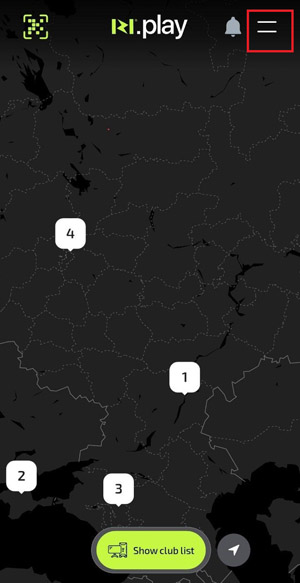
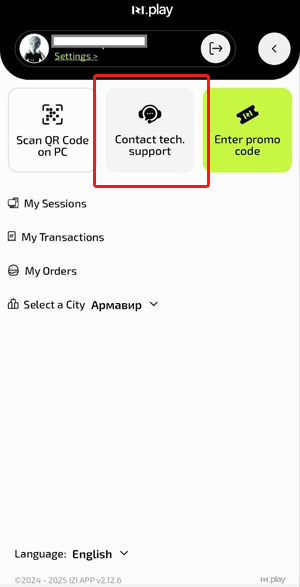
This option is for app users — players and guests of the club who want to report an issue directly.
How to contact support:
- Open the IZI.Play app.
- Go to the main menu by tapping “Menu” (icon at the top right).
- Select “Contact support”.
- Describe the issue in the chat that opens.
Common Situations
| Problem | What to do |
|---|---|
| Cannot find the club chat | Ask the club owner or check the CRM to see who was added to the Telegram chat |
| “Contact support” button does not work | Check the internet connection. Refresh the CRM admin panel page |
| Player cannot send a message from the app | Check if IZI.Play is updated and the device has a stable internet connection. Restart the app and try again |